서론
애플리케이션의 정보를 영구적으로 저장하기 위해서는 데이터베이스에 연결해야 한다.
내가 주로 사용하는 스프링 프레임워크에서 JDBC Template을 기반으로 데이터베이스 연결을 지원한다. 이에 따라 자바가 제공하는 JDBC, 스프링이 제공하는 JDBC Template에 대해 알아보고자 한다.
JDBC
JDBC(Java Database Connectivity)는 애플리케이션에서 데이터베이스에 접근하기 위해서 사용하는 자바 API이다. DB Access Logic을 통해 접근한다.
DB 종류가 여러가지 존재하기 때문에 DB에 따라 구현하는 DB 접근 로직이 달라져야 한다.
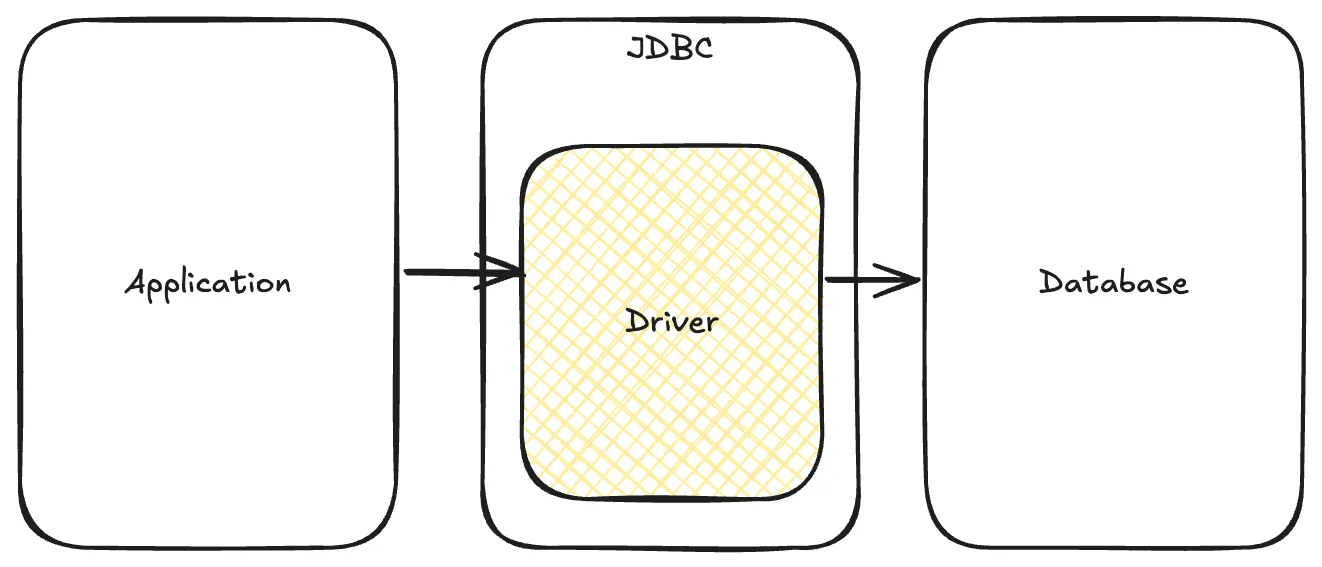
아래 코드는 JDBC를 사용해서 DB에 데이터 추가하는 로직이다. Connection 관리, 파라미터 관리, 예외처리 등 다양한 관리를 공통적으로 처리한다. 이 부분도 개발자가 관리해야 하는 몫이다.
public void insert(User user) throws SQLException {
    Connection con = null;
    PreparedStatement pstmt = null;
    try {
        con = ConnectionManager.getConnection();
        String sql = "INSERT INTO USERS VALUES (?, ?, ?, ?)";
        pstmt = con.prepareStatement(sql);
        pstmt.setString(1, user.getId());
        pstmt.setString(2, user.getPassword());
        pstmt.setString(3, user.getName());
        pstmt.setString(4, user.getEmail());

        pstmt.executeUpdate();
    } finally {
        if (pstmt != null) {
            pstmt.close();
        }

        if (con != null) {
            con.close();
        }
    }
}
public List<User> selectAll() throws SQLException {
Connection con = null;
PreparedStatement pstmt = null;
ResultSet rs = null;
try {
con = ConnectionManager.getConnection();
String sql = "SELECT id, password, name, email from USER";
pstmt = con.prepareStatement(sql);
rs = pstmt.executeQuery();
List<User> users = new ArrayList();
while (rs.next()) {
String id = rs.getString("id"),
String password = rs.getString("password"),
String name = rs.getString("name"),
String email = rs.getString("email"),
users.add(new User(id, password, name, email));
}
return users;
} finally {
if (rs != null) {
rs.close();
}
if (pstmt != null) {
pstmt.close();
}
if (con != null) {
con.close();
}
}
}Spring JDBC
스프링은 JDBC Template을 제공한다. JDBC Template은 반복적인 JDBC 코드를 대신 처리해주고 SQL 실행에만 집중할 수 있게 해주는 클래스이다.
아래의 코드는 Jdbc Template 클래스를 이용해서 데이터를 추가하는 로직이다. JDBC와 비교해서 Connection 설정이나 예외처리 등 많은 부분이 생략된 것을 알 수 있다.
public class UserDao {
        @Autowired
        private JdbcTemplate jdbcTemplate;

        public void insert(User user) {
                Stirng query = "insert into users values (?, ?, ?, ?);
                jdbcTemplate.update(query, user.getId(), user.getPwd(), user.getName(), user.getEmail());
        }
}
내부를 까보면 이런 모습이다.
public int update(String sql, @Nullable Object... args) throws DataAccessException {
    return this.update(sql, this.newArgPreparedStatementSetter(args));
}
JdbcTemplate을 확인해보니 초기화할 때 다음과 같이 dataSource, properties를 설정해준다. 이 중 DataSource에 우리가 흔히 아는 Connection 과정이 포함되어 있다.
public JdbcTemplate(DataSource dataSource) {
    this.setDataSource(dataSource);
    this.afterPropertiesSet();
}
public interface DataSource extends CommonDataSource, Wrapper {
Connection getConnection() throws SQLException;
...
}예외 처리나 인자 관리도 비교적 쉽게 수행할 수 있도록 JdbcTemplate 내의 메서드에서 구현되어 있다.
public int update(final String sql) throws DataAccessException {
    Assert.notNull(sql, "SQL must not be null");
    if (this.logger.isDebugEnabled()) {
        this.logger.debug("Executing SQL update [" + sql + "]");
    }

    class UpdateStatementCallback implements StatementCallback<Integer>, SqlProvider {
        UpdateStatementCallback() {
        }

        public Integer doInStatement(Statement stmt) throws SQLException {
            int rows = stmt.executeUpdate(sql);
            if (JdbcTemplate.this.logger.isTraceEnabled()) {
                JdbcTemplate.this.logger.trace("SQL update affected " + rows + " rows");
            }

            return rows;
        }

        public String getSql() {
            return sql;
        }
    }

    return updateCount((Integer)this.execute(new UpdateStatementCallback(), true));
}
정리하면 JdbcTemplate에서 JDBC에서 했어야 할 다양한 공통 처리를 대신 수행하기 때문에 우리는 쿼리에 집중한 코드를 작성할 수 있다.
참고
| Action | Spring | You |
| Define connection parameters. | X | |
| Open the connection. | X | |
| Specify the SQL statement. | X | |
| Declare parameters and provide parameter values | X | |
| Prepare and run the statement. | X | |
| Set up the loop to iterate through the results (if any). | X | |
| Do the work for each iteration. | X | |
| Process any exception. | X | |
| Handle transactions. | X | |
| Close the connection, the statement, and the resultset. | X |
https://docs.spring.io/spring-framework/reference/data-access/jdbc.html
'Spring > Core' 카테고리의 다른 글
| Spring DI(2) (0) | 2025.09.04 |
|---|---|
| JdbcTemplate 삽입 직후 Key 가져오기 (1) | 2025.09.03 |
| Spring DI(1) (0) | 2025.09.02 |
| Spring IoC Container (2) | 2025.09.01 |
| 스프링이란? (0) | 2025.08.30 |